Follow these steps after you have installed your LIME unit. Note this is mainly for installers or vessels operators to determine their unit is transmitting. It does not cover the data subscription piece.
Follow these steps after you have installed your LIME unit.
- Ensure the red LED light on front of lime unit is flashing (indicating unit is getting sufficient power)
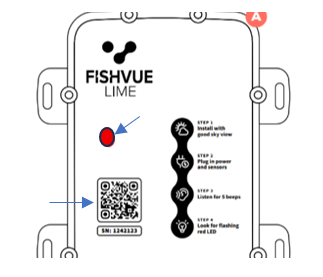
- Ensure the unit has been powered on for 15 minutes
- Scan the QR code located below the red LED light on the front of the unit and allow the Link to Archipelago’s LIME support site OR go to Check my LIME
- Enter the 7- digit LIME serial number (if not auto-populated from QR code scan) INTO THE lime Serial number field and the click Check. Lime Serial number is located below the QR code on the front of the LIME
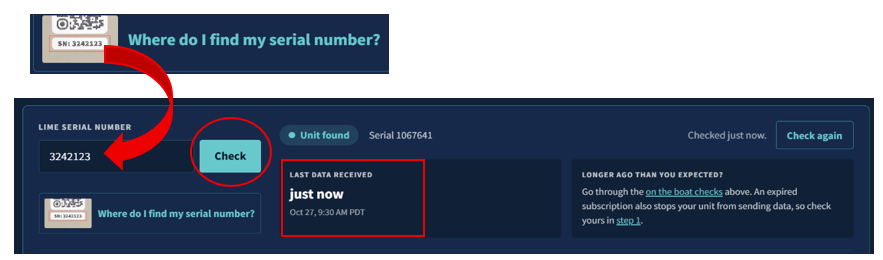
- Check the Last Data Received date/time to see if it is very recent. If it is your unit is transmitting data. If no data is received, wait a few minutes and click Check again.
NOTE: A transmitting unit means the unit is functional, but the LIME unit MUST also have an active data subscription to avoid violations. Vessel owner/operator should go to the here to purchase the data subscription Archipelago Store - Data Subscriptions
Was this article helpful?
That’s Great!
Thank you for your feedback
Sorry! We couldn't be helpful
Thank you for your feedback
Feedback sent
We appreciate your effort and will try to fix the article